
=== WordPress Importer === Contributors: wordpressdotorg Donate link: https://wordpressfoundation.org/donate/ Tags: importer, wordpress Requires at least: 5.2 Tested up to: 6.8 Requires PHP: 7.2 Stable tag: 0.9.5 License: GPLv2 or later License URI: https://www.gnu.org/licenses/gpl-2.0.html Import posts, pages, comments, custom fields, categories, tags and more from a WordPress export file. == Description == The WordPress Importer will import the following content from a WordPress export file: * Posts, pages and other custom post types * Comments and comment meta * Custom fields and post meta * Categories, tags and terms from custom taxonomies and term meta * Authors For further information and instructions please see the [documention on Importing Content](https://wordpress.org/support/article/importing-content/#wordpress). == Installation == The quickest method for installing the importer is: 1. Visit Tools -> Import in the WordPress dashboard 1. Click on the WordPress link in the list of importers 1. Click "Install Now" 1. Finally click "Activate Plugin & Run Importer" If you would prefer to do things manually then follow these instructions: 1. Upload the `wordpress-importer` folder to the `/wp-content/plugins/` directory 1. Activate the plugin through the 'Plugins' menu in WordPress 1. Go to the Tools -> Import screen, click on WordPress == Changelog == = 0.9.5 = * Rewrite CSS URLs in block markup (e.g., cover blocks with background images). * Code refactoring: Extract import processing logic into separate methods to prepare for future streaming support. * Update Playwright and @playwright/test dependencies from 1.55.0 to 1.56.1. * Clean up vendor-patched dependencies by removing dotfiles and GitHub workflow files. = 0.9.4 = * Fix a bug that caused self-closing blocks to be incorrectly serialized during URL rewriting. = 0.9.3 = * Rewrite attachment URLs to the new URL structure = 0.9.2 = * Rewrite site URLs in block attributes. = 0.9.1 = * Add support for rewriting site URLs in post content and excerpts. = 0.9.0 = * Introduce a new XML parser class `WXR_Parser_XML_Processor` that replaces the deprecated `WXR_Parser_Regex` class. = 0.8.4 = * Fix a bug on deserialization of untrusted input. * Update compatibility tested-up-to to WordPress 6.7.2. = 0.8.3 = * Update compatibility tested-up-to to WordPress 6.7. * Update call to `post_exists` to include `post_type` in the query * PHP 8.4 compatibility fixes. = 0.8.2 = * Update compatibility tested-up-to to WordPress 6.4.2. * Update doc URL references. * Adjust workflow triggers. = 0.8.1 = * Update compatibility tested-up-to to WordPress 6.2. * Update paths to build status badges. = 0.8 = * Update minimum WordPress requirement to 5.2. * Update minimum PHP requirement to 5.6. * Update compatibility tested-up-to to WordPress 6.1. * PHP 8.0, 8.1, and 8.2 compatibility fixes. * Fix a bug causing blank lines in content to be ignored when using the Regex Parser. * Fix a bug resulting in a PHP fatal error when IMPORT_DEBUG is enabled and a category creation error occurs. * Improved Unit testing & automated testing. = 0.7 = * Update minimum WordPress requirement to 3.7 and ensure compatibility with PHP 7.4. * Fix bug that caused not importing term meta. * Fix bug that caused slashes to be stripped from imported meta data. * Fix bug that prevented import of serialized meta data. * Fix file size check after download of remote files with HTTP compression enabled. * Improve accessibility of form fields by adding missing labels. * Improve imports for remote file URLs without name and/or extension. * Add support for `wp:base_blog_url` field to allow importing multiple files with WP-CLI. * Add support for term meta parsing when using the regular expressions or XML parser. * Developers: All PHP classes have been moved into their own files. * Developers: Allow to change `IMPORT_DEBUG` via `wp-config.php` and change default value to the value of `WP_DEBUG`. = 0.6.4 = * Improve PHP7 compatibility. * Fix bug that caused slashes to be stripped from imported comments. * Fix for various deprecation notices including `wp_get_http()` and `screen_icon()`. * Fix for importing export files with multiline term meta data. = 0.6.3 = * Add support for import term metadata. * Fix bug that caused slashes to be stripped from imported content. * Fix bug that caused characters to be stripped inside of CDATA in some cases. * Fix PHP notices. = 0.6.2 = * Add `wp_import_existing_post` filter, see [Trac ticket #33721](https://core.trac.wordpress.org/ticket/33721). = 0.6 = * Support for WXR 1.2 and multiple CDATA sections * Post aren't duplicates if their post_type's are different = 0.5.2 = * Double check that the uploaded export file exists before processing it. This prevents incorrect error messages when an export file is uploaded to a server with bad permissions and WordPress 3.3 or 3.3.1 is being used. = 0.5 = * Import comment meta (requires export from WordPress 3.2) * Minor bugfixes and enhancements = 0.4 = * Map comment user_id where possible * Import attachments from `wp:attachment_url` * Upload attachments to correct directory * Remap resized image URLs correctly = 0.3 = * Use an XML Parser if possible * Proper import support for nav menus * ... and much more, see [Trac ticket #15197](https://core.trac.wordpress.org/ticket/15197) = 0.1 = * Initial release == Frequently Asked Questions == = Help! I'm getting out of memory errors or a blank screen. = If your exported file is very large, the import script may run into your host's configured memory limit for PHP. A message like "Fatal error: Allowed memory size of 8388608 bytes exhausted" indicates that the script can't successfully import your XML file under the current PHP memory limit. If you have access to the php.ini file, you can manually increase the limit; if you do not (your WordPress installation is hosted on a shared server, for instance), you might have to break your exported XML file into several smaller pieces and run the import script one at a time. For those with shared hosting, the best alternative may be to consult hosting support to determine the safest approach for running the import. A host may be willing to temporarily lift the memory limit and/or run the process directly from their end. -- [Support Article: Importing Content](https://wordpress.org/support/article/importing-content/#before-importing) == Filters == The importer has a couple of filters to allow you to completely enable/block certain features: * `import_allow_create_users`: return false if you only want to allow mapping to existing users * `import_allow_fetch_attachments`: return false if you do not wish to allow importing and downloading of attachments * `import_attachment_size_limit`: return an integer value for the maximum file size in bytes to save (default is 0, which is unlimited) There are also a few actions available to hook into: * `import_start`: occurs after the export file has been uploaded and author import settings have been chosen * `import_end`: called after the last output from the importer Jasa Cetak Standing Pouch Bekasi Terbaik | Nusapack Skip to main content

Jasa Cetak Kemasan Custom Berkualitas | Nusa Pack

Jasa Cetak Standing Pouch Bekasi Terbaik untuk Tingkatkan Omzet Bisnis

Jasa Cetak Standing Pouch Bekasi Terbaik untuk Tingkatkan Omzet Bisnis

cetak standing pouch bekasi

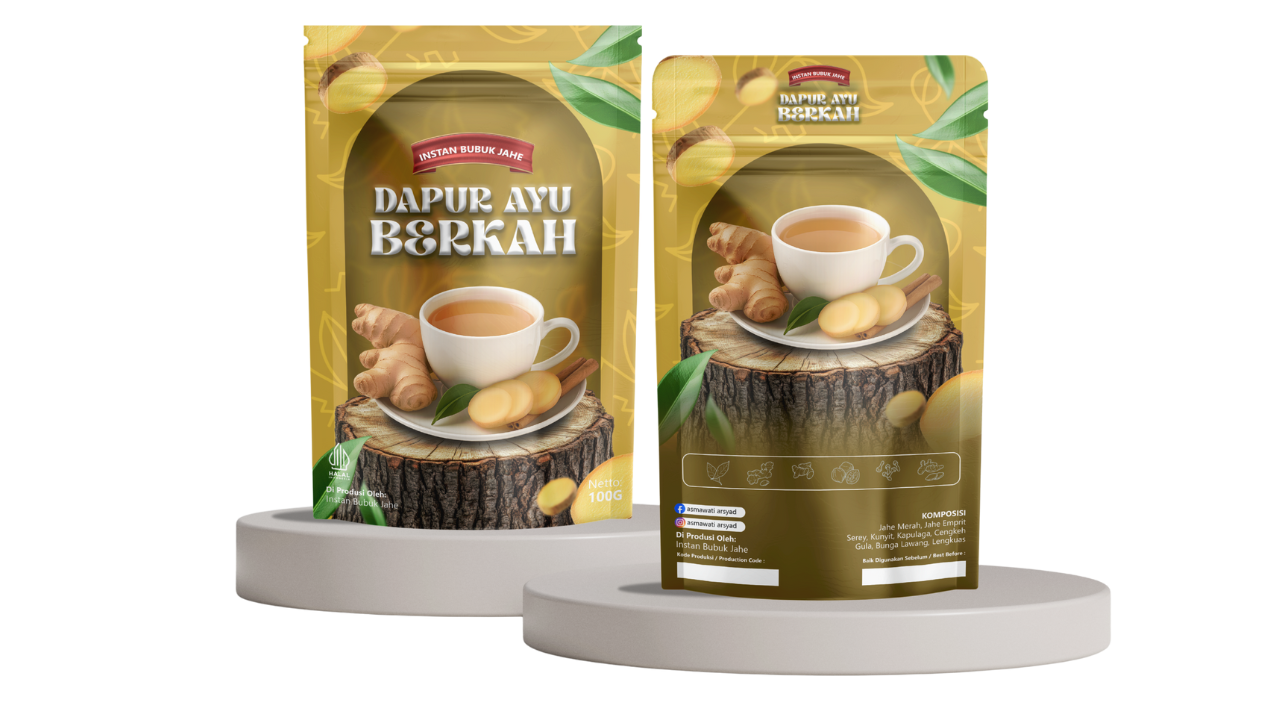
Menarik perhatian konsumen sejak pandangan pertama merupakan kunci utama dalam memenangkan persaingan bisnis saat ini. Oleh karena itu, Anda harus memperhatikan kualitas visual produk dengan sangat serius. Salah satu cara paling efektif untuk mewujudkannya adalah dengan menggunakan kemasan modern. Jika Anda sedang mencari jasa cetak standing pouch Bekasi yang profesional, Nusapack hadir sebagai mitra strategis untuk bisnis Anda.

Melalui artikel ini, kami akan mengupas tuntas mengapa standing pouch menjadi pilihan ideal serta bagaimana Nusapack membantu Anda menciptakan kemasan yang menjual.

Mengapa Pelaku Usaha Memilih Standing Pouch?

Berbagai industri mulai dari makanan ringan, bubuk kopi, bumbu dapur, hingga produk kosmetik kini beralih menggunakan kemasan ini. Tentu saja, keputusan tersebut bukan tanpa alasan. Berikut adalah beberapa keunggulan utama yang akan Anda dapatkan:

Pertama, desain kemasan ini memungkinkan produk berdiri tegak di atas rak pajangan (etalase). Dengan demikian, pelanggan dapat melihat merek Anda dengan jauh lebih jelas dan menarik.

Selain itu, standing pouch menawarkan perlindungan maksimal. Material fleksibel berkualitas tinggi menjaga produk tetap segar, menahan kelembapan, serta mencegah masuknya udara yang merusak kualitas isi produk.

Selanjutnya, Anda juga turut menghemat ruang penyimpanan dan biaya distribusi. Berbeda dengan botol atau toples kaca yang berat dan memakan tempat, kemasan fleksibel ini sangat ringan dan praktis Anda simpan dalam jumlah besar.

Keunggulan Jasa Cetak Standing Pouch Bekasi dari Nusapack

Sebagai vendor packaging terpercaya, Nusapack memahami bahwa setiap bisnis memiliki kebutuhan yang unik. Oleh karena itu, kami merancang layanan kami untuk mendukung pertumbuhan bisnis Anda secara optimal.

1. Kualitas Cetak Tajam dan Premium

Kami menggunakan teknologi mesin cetak terbaru untuk menghasilkan warna yang cerah dan detail grafis yang tajam. Hasilnya, desain kemasan Anda akan terlihat profesional dan eksklusif.

2. Pilihan Material Beragam

Nusapack menyediakan berbagai opsi bahan, mulai dari plastik bening (transparan), metalized, alumunium foil, hingga material kraft yang ramah lingkungan. Anda bebas menentukan bahan yang paling sesuai dengan karakteristik produk Anda.

3. Harga Kompetitif untuk Semua Skala Bisnis

Kami menawarkan struktur harga yang fleksibel. Artinya, baik Anda baru merintis usaha kecil maupun mengelola perusahaan skala menengah, Anda tetap bisa mendapatkan harga terbaik tanpa mengorbankan kualitas.

4. Proses Pengerjaan Cepat dan Tepat Waktu

Kami menghargai waktu Anda. Tim produksi Nusapack bekerja secara efisien untuk memastikan pesanan Anda selesai sesuai tenggat waktu yang telah kita sepakati bersama.

Tips Menentukan Desain Kemasan yang Menarik

Sebelum Anda menghubungi vendor pencetakan, ada baiknya Anda merumuskan konsep desain terlebih dahulu. Pertama-tama, pastikan logo dan nama merek tampil mencolok. Kemudian, gunakan kombinasi warna yang mencerminkan identitas merek Anda. Terakhir, cantumkan informasi penting seperti komposisi, berat bersih, dan izin edar (PIRT/BPOM) agar konsumen merasa aman saat membeli produk Anda.

Menerapkan standar desain yang baik juga sejalan dengan anjuran dari Kementerian Koperasi dan UKM Republik Indonesia (External Link), yang terus mendorong pelaku usaha untuk berinovasi pada sektor pengemasan guna meningkatkan daya saing di pasar nasional.

Pesan Kemasan Impian Anda Sekarang!

Kesimpulannya, kemasan bukan sekadar wadah, melainkan alat pemasaran paling diam yang bekerja 24 jam untuk merek Anda. Jangan biarkan produk unggulan Anda tenggelam di pasaran hanya karena packaging yang kurang menarik.

Nusapack siap membantu Anda mewujudkan kemasan berkualitas tinggi. Anda bisa menelusuri berbagai opsi portofolio kami melalui halaman Katalog Produk Standing Pouch Nusapack .

Hubungi tim konsultan kami hari ini dan diskusikan kebutuhan jasa cetak standing pouch Bekasi untuk bisnis Anda!

Frequently Asked Questions (FAQ)

1. Berapa minimum order (MOQ) untuk cetak standing pouch di Nusapack?

Nusapack menawarkan fleksibilitas jumlah pesanan yang sangat bersahabat bagi pelaku UMKM mulai dari 100pcs. Anda bisa menghubungi tim customer service kami untuk menyesuaikan kuantitas pesanan dengan anggaran yang Anda miliki.

2. Apakah Nusapack bisa membantu membuat desain kemasan?

Ya, kami memiliki tim desain profesional yang siap membantu Anda merancang konsep visual yang menarik, modern, dan sesuai dengan target pasar produk Anda.

3. Berapa lama proses pengerjaan cetak standing pouch?

Waktu produksi sangat bergantung pada jumlah pesanan dan antrean cetak. Rata-rata, kami menyelesaikan pesanan dalam rentang waktu 7 hingga 14 hari kerja setelah Anda menyetujui desain final (approval).

4. Apakah Nusapack melayani pengiriman ke luar Bekasi?

Tentu saja. Meskipun basis layanan kami sangat kuat di Bekasi, kami secara rutin mendistribusikan pesanan kemasan ke seluruh wilayah Indonesia menggunakan layanan ekspedisi kargo yang aman dan terjangkau.

5. Material apa yang paling cocok untuk produk makanan ringan?

Kami merekomendasikan material metalized atau alumunium foil untuk produk makanan ringan yang renyah. Material ini memiliki lapisan pelindung ekstra yang mencegah cahaya dan udara masuk, sehingga produk Anda mempertahankan tekstur renyahnya lebih lama.

Share the Post:

Related Posts